RHEOME / DOCUMENT RH-03 / KYMECREO
kymecreo
00Summary
A velocity-sensitive, hall-effect, ergonomic-split MIDI keyboard. Mechanical switches that actually read how hard you press — built for the hands that want to play mutax.
Working title. Still the best MIDI controller idea I've had and still needs a better name.
01The idea
I've always been a sucker for a nice mechanical switch, and I'd wondered for years how to make a MIDI keyboard out of them. The wall was always the same: a switch outputs a boolean, on or off. For music that's useless — velocity is how a performance breathes. Then, in the first week of a program, I stumbled onto the answer: analog hall-effect switches.
A small magnet in the switch stem moves toward a sensor as the key travels. The sensor reads the distance as a continuous value, and that value becomes MIDI velocity. Add a silicone O-ring inside the keycap and you get aftertouch too — the range you reach by pressing a bottomed-out key even harder.
02Build log
The idea, finally: combine the deep nerdosphere of ergonomic split mechanical keyboards with expressive MIDI control. The problem was always that switches only output a boolean — on or off. Music is dynamic; velocity is everything. Then I found analog switches.
How they work: a magnet in the switch stem moves toward a hall-effect sensor as you press. The sensor reads how far down the key is — an analog range, not a 1 or a 0 — which becomes velocity. Wired one Lekker switch over a sensor into an Arduino Nano and the serial plotter drew a beautiful curve, picking up the slightest movement. Proof of concept. Ordered a big perfboard.
Night one: soldered the hall sensors in an ergonomic layout I designed by putting my hand on the board and marking where my fingers naturally landed. Night two: six hours soldering everything — headers, sockets, power and ground per sensor, and a joystick as an XY thumb mod-wheel (which needed its own tiny sub-board so power and ground wouldn't short on one trace). "This is my first successful soldering project, I am still in disbelief that I got it running in one night."
Flashed it, held my breath, plugged in the Teensy. It worked. Fun bug: the key sitting under a 5V trace read high by default — the switch was acting as a tiny electromagnet. Velocity and aftertouch (squish a fully-pressed key into a silicone O-ring) both came through. Analog mechanical-switch MIDI controllers work.
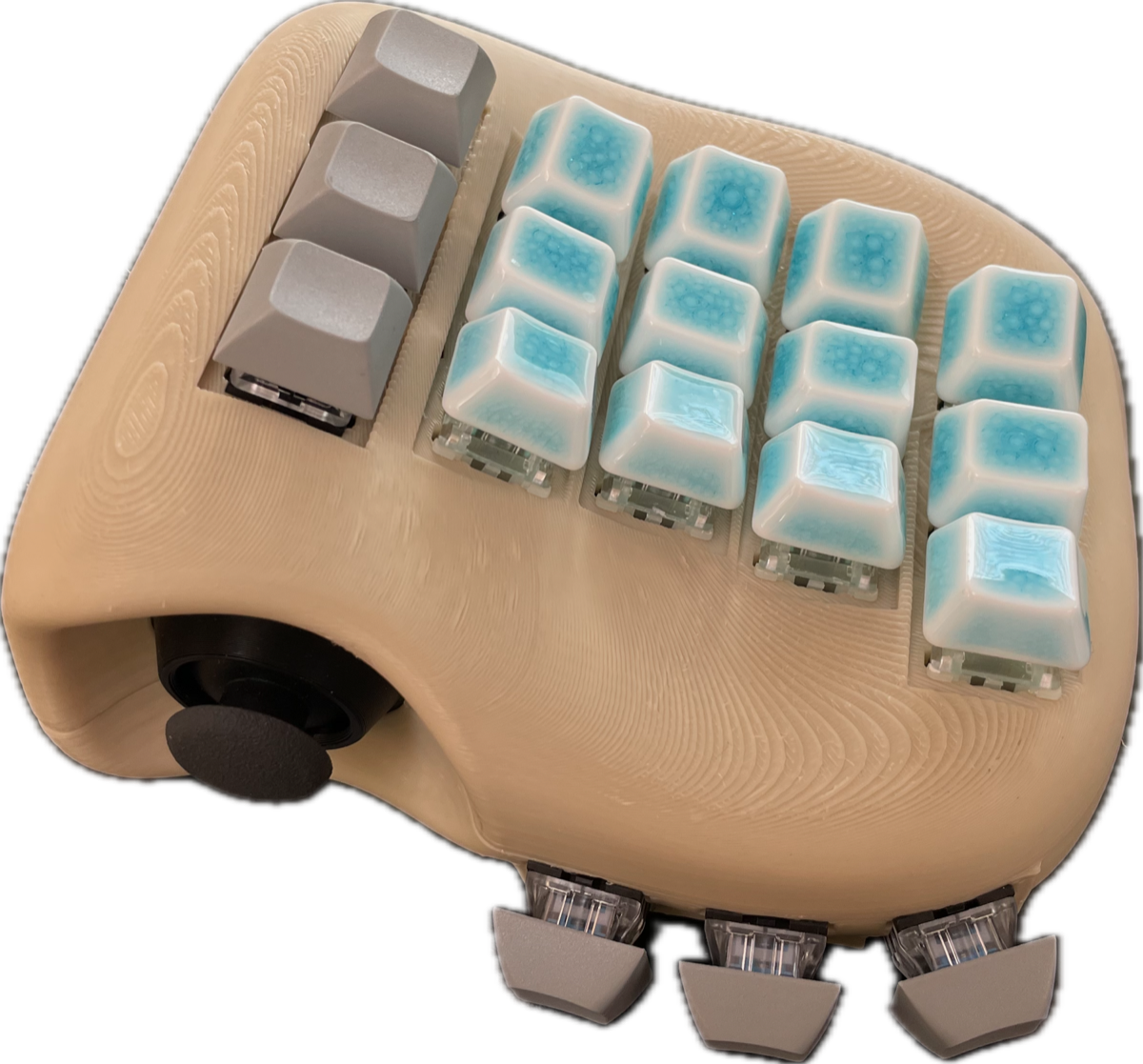
Started the enclosure. Printed the open-source Skeletyl ergo-split, cut off the thumb cluster, then sculpted Sculpey clay around it to hold the joystick and find a shape my hand liked. 3D-scanned the clay with an iPad, then re-modeled it from scratch in Fusion 360 using the scan as reference and cutting switch holes from an array of negatives.
Open threads: proper velocity resolution (right now it's basically two values, med and high) and polyphonic aftertouch; octave control beyond the current twelve notes; a left-hand companion controller for note range, timbral CC, and looper control; a real PCB; MPE; and, eventually, a better name than kymecreo.
03Watch
04Spec
| Type | velocity-sensitive MIDI keyboard (prototype) |
|---|---|
| Switches | Lekker / Gateron analog hall-effect magnetic switches |
| Sensing | OH49E hall sensors → analog key depth → velocity |
| Aftertouch | silicone O-ring inside the keycap |
| Brain | Teensy 4.1, Arduino MIDIUSB |
| Extra | joystick as an XY thumb mod-wheel |
| Enclosure | Skeletyl-derived ergo-split, sculpted then modeled in Fusion 360 |